Recreate the FIFA 26 Poster Pattern on Any Image, Then Turn It Into Video
The layered echo pattern, rebuilt with one prompt. And the wall that hits the moment it moves.

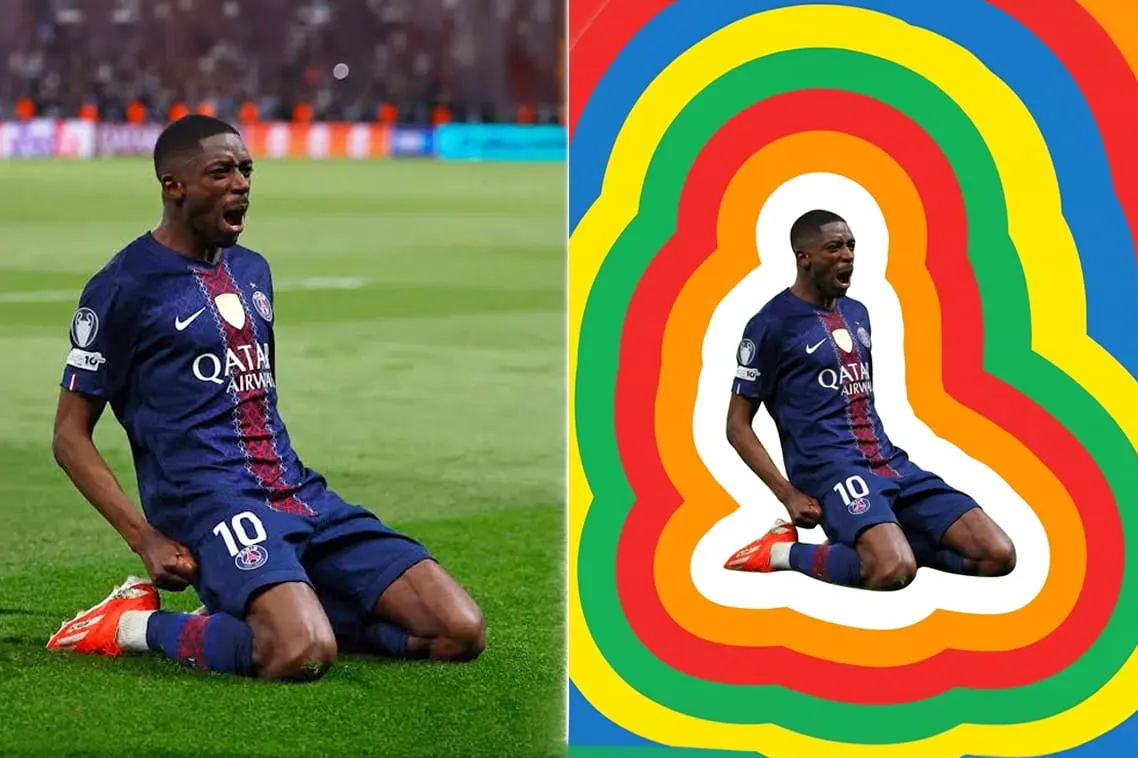
The FIFA 26 key visual has one job. Make a player look monumental.
It does it with a pattern. Concentric bands radiating outward from a silhouette until they fill the frame. Flat colour. No gradients. Paper cut depth. Stacked, pressurised, unmissable.
I call it the layered echo pattern.
Designers build this by hand. Offset paths, one at a time, each one cleaned and smoothed. It is slow and it is precise and it is exactly the kind of work AI is supposed to eat.
So I gave it one prompt
The reference
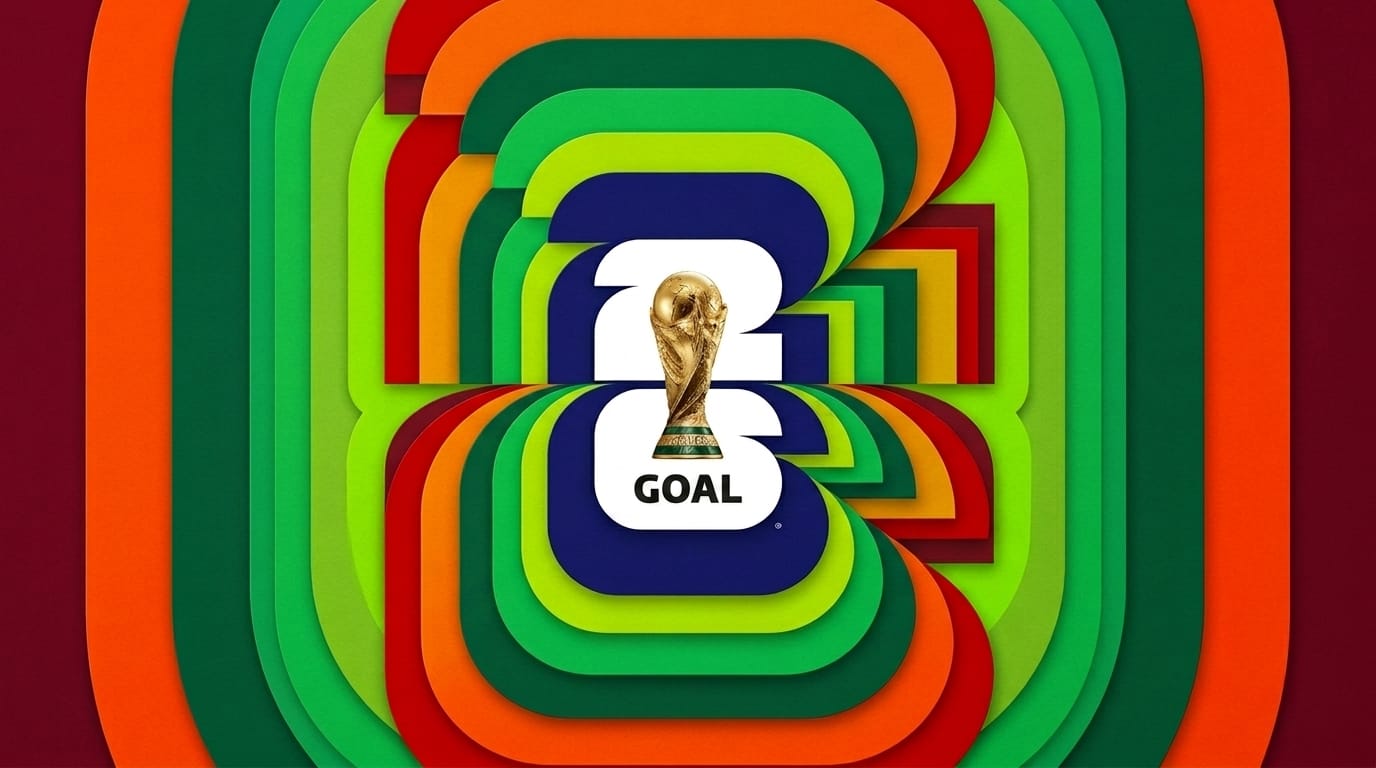
The output
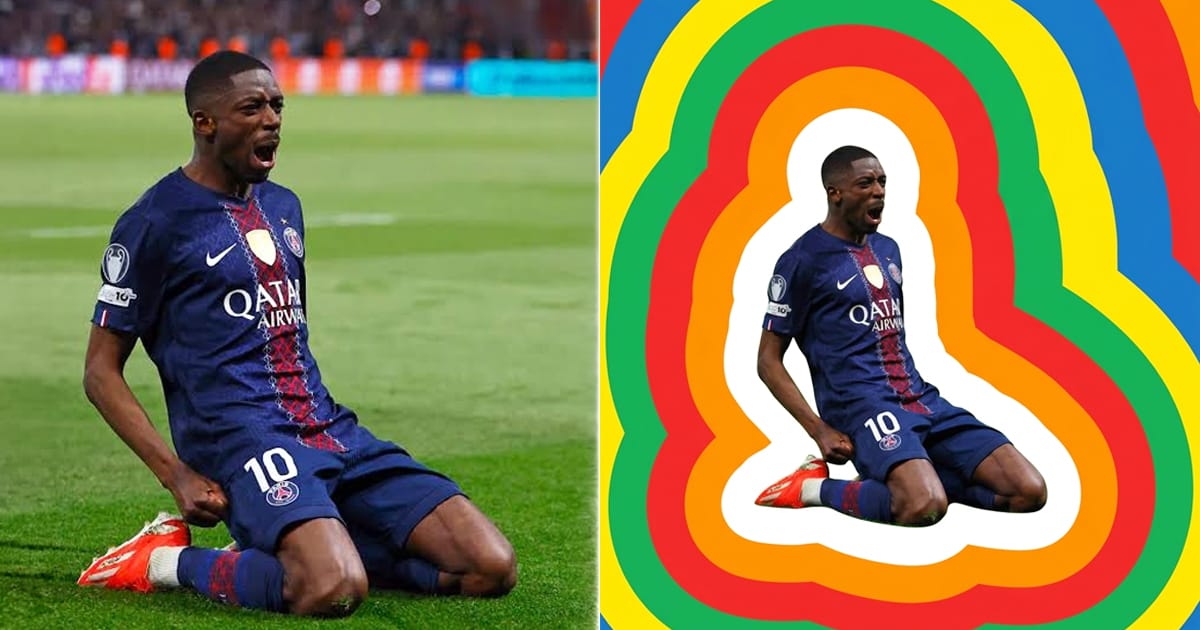
Left, the original photo. Right, the same photo wrapped in the pattern.
No design software. No pen tool. No manual offset paths.
How the prompt works
One input. Three moves.
First, the original photo stays untouched at the centre of the frame. The subject is never redrawn. Only surrounded.
Second, extract a simplified silhouette. Broad body shape only. No fingers. No hair strands. No shoe edges. A gummy sticker cutout, not a mask.
Third, generate six concentric bands outward from that contour. White first, five times thicker than the rest. Then orange, red, green, yellow, blue. Flat fills, edge to edge.
The trick is not the colour. It is the silhouette.
This is the part most people get wrong.
If you let the model trace fine detail, the offset bands inherit that detail. Every finger becomes five wobbles. Every hair strand becomes a spike. Six bands later the pattern is noise and the poster is dead.
You have to tell it what not to see.
How to use the prompt
The prompt does not generate a subject. It wraps one.
You need to bring the image.
- Pick a photo with a clear, isolatable subject. A single figure against a busy background works. A crowd does not. The model has to find one contour to offset from.
- Open Google Flow and select the Nano Banana Pro model. This is an image editing pass, not a text to image pass.
- Attach the photo as the base image. The prompt refers to "the attached photo" and it means it. Without a base image, the model has nothing to build the silhouette from and it will invent one.
- Paste the prompt. Run it.
- Adjust colours and band count in the prompt text if you want to match a different brand palette. Everything else stays fixed.
The photo is the input. The prompt is the treatment.
The full prompt
Use the attached photo as the subject. Place the original unmodified photo at the center of the frame. Extract a simplified, smoothed silhouette of the subject. Do not trace fine details like individual fingers, hair strands, or shoe edges. Capture only the broad overall body shape. The silhouette should read as a clean bold gummy shape, like a sticker cutout, not a detailed mask. From that simplified silhouette edge, generate exactly 6 concentric outward offset bands. Each band follows that same smooth clean contour. Band order and thickness, inside out: Band 1 (white): extremely thick, 5 times the width of every other band. Bold, dominant, clean. Bands 2 through 6: equal thickness, bold and chunky. Colors: orange, red, green, yellow, blue. Flat solid fills. No gradients. Bands fill the entire frame edge to edge. Apply high focal length perspective, approximately 200mm telephoto compression. Bands feel stacked, pressurized, monumental. The original photo remains untouched at the center. No text. No logos. 1:1 square. Bold graphic, retro sport poster aesthetic.
Swap the subject. Swap the colours. It holds.
Then I tried to animate it
This is where it broke.
I took the same subject into Google Flow to generate video. The still image had passed without a flag. The moment it became motion, the model refused.
Face flagged. Likeness flagged. Resemblance flagged.
A poster of a footballer is fine. A moving footballer is not.
It is FIFA season. Every model is locked down on player likeness and the threshold for video is far lower than for stills.
The workaround
I turned the players around.
Back to camera. Jersey number. Surname. Team colours. No face. No likeness. No block.
It cleared the filter immediately.
And it turned out better than the front view. A player from behind is anonymous and universal. It could be anyone. That is the whole point of a poster.
FIFA 26 Layered Echo Pattern Animated with AI
Where it still fails
The name on the jersey.
The model renders the number cleanly every time. The surname comes out wrong on a large share of passes. Letters drop. Accents shift. Sometimes it invents a name that was never in the prompt.
I have not solved this yet.
Kling and Seedance are next. Text rendering is the difference between a workflow and a party trick, and right now this one is still a party trick at the last mile.
What this actually is
Not a shortcut. Not a productivity hack.
It is one prompt that does in twenty seconds what used to be an afternoon of offset paths, and gives that afternoon back.
That is the only reason to use it.
Written with AI in the room, on a post about making with AI. The craft shown live, not hidden.
Frederick Tadeo is a GenAI Creative Lead based in Dubai with 20 years in digital and advertising across Leo Burnett, Publicis Groupe, ARC Worldwide and Masdar, with work awarded at Cannes Lions, Dubai Lynx, The FWA, MENA Cristal and the Effies. He is the founder of STIRMIND, a GenAI native creative studio and platform where he builds with AI every day and publishes what actually works. More breakdowns, prompts and workflows at stirmind.com, or find him on LinkedIn.


